



Your Ultimate Guide to Using GOOLOO Products
Learn how to use your GOOLOO jump starter, charge your devices, operate the emergency flashlight, use DC output, and keep your jump starter ready when you need it most.
✓ Quick Answer
To use a GOOLOO jump starter, make sure the unit has sufficient battery power, connect the smart jumper cable correctly, attach the red clamp to the positive (+) terminal and the black clamp to the negative (−) terminal, then start the vehicle. GOOLOO jump starters can also be used as portable power banks, emergency flashlights, and, on compatible models, DC power sources.
Parts and Functional Description
GOOLOO jump starters are designed with several easy-to-use features, including a battery indicator, power switch, LED flashlight, input/output ports, and jumper cable connection. Each feature serves a specific purpose and helps you use the jump starter safely and efficiently.
GOOLOO GP4000 Jump Starter
The battery indicator shows the remaining battery level. To check the available battery power, simply press the power switch.
View GOOLOO GP4000 →
How to Jump-Start a Vehicle
Follow these steps to safely use your GOOLOO jump starter when your vehicle's battery is dead or unable to start the engine.
Connect the smart jumper cable fully into the jump starter and make sure the two indicators on the jumper cable are off.

Connect the red clamp to the positive (+) battery terminal and the black clamp to the negative (−) battery terminal.

Check the indicator lights on the jumper cable. Press the button if required, then start your vehicle's engine.

Once the vehicle has started, remove the jumper cable from the jump starter and then disconnect it from the vehicle battery.

How to Charge Your Phone, Bluetooth Headphones or Tablet
Compatible GOOLOO jump starters can also work as portable power banks for charging everyday electronic devices.
Plug the charging cable into the USB-A port of the GOOLOO jump starter and connect it to your device.
Press the power switch. The unit can identify the connected device and begin charging automatically. The battery indicators will illuminate while charging.

How to Turn On/Off the LED Flashlight
GOOLOO jump starters can also provide emergency lighting. Long press the power switch for approximately 3 seconds to turn on the LED flashlight.
Press the power switch briefly to cycle through the available lighting modes: Normal → Strobe → SOS → Off.

How to Use GOOLOO Jump Starters' DC Output
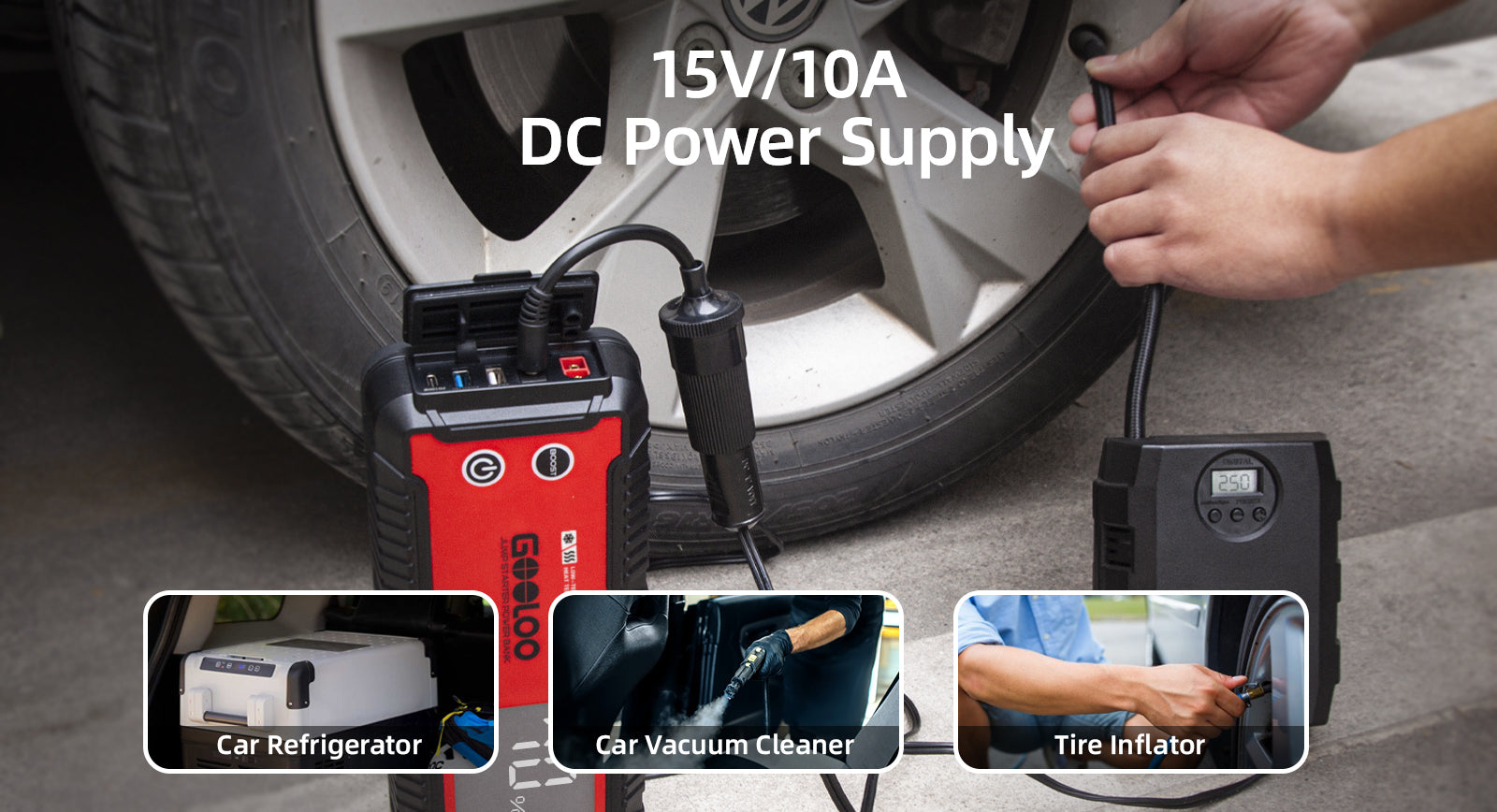
Many GOOLOO jump starters include a DC output for powering compatible 12V or 15V devices. Depending on the model, DC output options can reach 12V/10A or 15V/10A.
For example, the GOOLOO GT3000 and GT4000 jump starters can provide up to 150W of DC output.
How to Use the DC Output
Connect the DC output cable to the DC output port of the GOOLOO jump starter and the DC input port of the device you want to power. Make sure the connection is secure.
Turn on the connected device and check that it is operating normally.
How to Charge the GOOLOO Jump Starter
Depending on the model, GOOLOO jump starters support multiple charging methods, including USB Type-C charging, wall chargers, car chargers, and compatible phone chargers.
For example, the GOOLOO GT4000 can be charged using a Type-C cable, a 5V wall charger, or a car charger. Please note that the 5V wall charger and car charger are not included with the GT4000.
When using a compatible 100W car charger, the GT4000 can charge from 0% to 100% in approximately 45 minutes.
The GT3000, GT4000, and GT4000S also support fast charging with a compatible 100W wall charger, allowing the battery to reach approximately 20% in about three minutes.


During charging, the battery indicators will blink one by one. The number of solid indicators shows the current battery level. When charging is complete, all indicators will automatically turn off.

Frequently Asked Questions
How do I use a GOOLOO jump starter?
First, make sure the jump starter has enough battery power. Connect the smart jumper cable, attach the red clamp to the positive (+) battery terminal and the black clamp to the negative (−) terminal, then follow the cable indicator instructions before starting the vehicle.
How do I know how much power is left in my GOOLOO jump starter?
Press the power switch to activate the battery indicator. The illuminated indicators show the remaining battery level.
Can a GOOLOO jump starter charge my phone?
Yes. Compatible GOOLOO jump starters can be used as portable power banks to charge devices such as smartphones, Bluetooth headphones, and tablets through the available USB output.
How do I turn on the GOOLOO LED flashlight?
Long press the power switch for approximately 3 seconds to turn on the LED flashlight. Briefly press the button to cycle through the lighting modes.
Can I use the GOOLOO jump starter as a power source?
Some GOOLOO jump starters include a DC output that can power compatible devices. Check your specific model's specifications and voltage requirements before connecting another device.
How should I charge my GOOLOO jump starter?
Charging methods vary by model. Depending on the jump starter, you may be able to use a USB Type-C cable, wall charger, car charger, or another compatible power source.
How do I know when the jump starter is fully charged?
During charging, the battery indicators show the charging progress. On compatible models, all indicators will turn off automatically when charging is complete.
Keep Your GOOLOO Ready to Go
A properly charged jump starter can be a useful tool for emergencies, road trips, and everyday driving. Check your GOOLOO model's specifications and keep it charged so it is ready when you need it.


9 thoughts on “How to Use a GOOLOO Jump Starter | Step-by-Step Guide”
James Bazemore
I have a gooloo ge1500 modeljs-378b where do you plug in jump start cable. No video shows this unit andI can’t find the port
Derek
I HAVE JUST BOUGHT GOOLOO A3 JUMP STARTER WITH TURE INFLATOR-I WANT TO CHECK THE VOLTAGE OF MY BATTERY -WHEN I CONNECTED THE CABLE TO UNIT AND THEN TO THE BATTERY TERMINALS I EXPECTED THE VOLTAGE OF THE BATTERY TO SHOW-I HAVE LOOKED AT THE FILMS ON YOU TUBE BUT IT DOES NOT SHOW ANYTHING.CAN YOU TELL.ME WHICH BUTTON I HAVE TO PRESS TO GET FROM INDLATOR MODE TO BATTERY TESTING MODE , THANK YOU
Michael Evans
I wouldn’t buy a gooloo product again
Michael Evans
Bought a gooloo x7 , but it constantly starts up every time I try to charge it.
ben
hi, can you confirm what the charging led indicator represents when the leds sequentially cycle through first 4 solid bars, then each bar lights up, then the 4th bar flashes, then 4 solid bars again, does this mean its fully charged? im doing the initial charge after receiving my gp3000, it has been plugged in for a number of hours, i was led to believe that the charge status leds would go off when it is fully charged, this has not happened